Customer billing account
To view the billing details for a customer, simply find their details page, via smart search or via People & Orgs and then click on their "Billing" tab.
At the top of the billing tab you will see an overview of the party's account:
- The Non-Invoiced amount is where the customer has ordered a product/service but some (or all) of the cost of that service has not yet been invoiced - either through the operative's choice, or because the standard Invoice Schedule Template for that service mandates payment in instalments. For example, if you take a deposit to secure the booking and a balance payment later on, the balance payment will be counted as non-invoiced until such point as it is.
- The Net Invoiced amount is the sum total of all raised invoices, minus any credit notes.
- The Net Paid amount is the sum total of all payments received, minus any refunds processed.
- The Balance is the difference between net invoiced and net paid, and indicates whether the customer is in debit (a positive value) or in credit (a negative value). If the Balance is £0.00, the account is balanced.
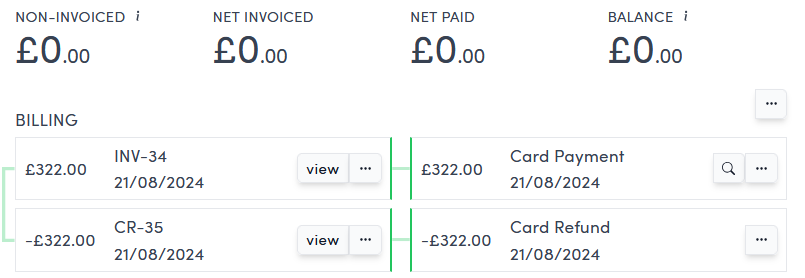
Underneath the summary section, you'll see all invoices/credit notes down the left hand side (on a desktop or tablet) and then the payments and refunds down the right hand side.
In the example above you can see an initial invoice on the left hand side that is paid using a card payment. That payment is automatically allocated against the invoice (the green line joining them). Subsequently, the order is cancelled which generates a credit note against the original invoice. The original payment is refunded automatically back on to the card and allocated against the credit note.
This account is in a fully reconciled state (all invoices, credit notes, payments and refunds are completely balanced).
You can read more about allocations here.