Automatic Invoice Reminders
Swiftlier can send automatic email reminders to Customers when invoices remain unpaid. By default, Swiftlier will send reminders at the following times:
- On the day that the invoice is due. This is dictated by the Invoice Schedule for a particular order. You can read more about invoice schedules here.
- 7 days after the invoice is due.
- 14 days after the invoice is due.
This schedule is customisable for your organisation. Please contact your Customer Success representative if you wish to amend the timings of these reminders.
Email recipients and content
Email reminders will be sent only to the Customer on an order, and not to the attendee or any other Person associated with the order.
As the same bank of email content could potentially be used to remind customers of unpaid invoices across a range of product/service types, the email reminder content is highly generic. Please contact your Customer Success representative if you would like to discuss customisation of your email reminder content.
The email reminder will contain a link to pay online. Customers will be able to click the link and pay using the usual payment methods accepted by your organisation.
Switching off reminders
There may be particular Customers or Invoices for which you don't want to send automatic invoice reminders by email. For example, if you have agreed a payment plan with a Customer that will result in them paying off a small amount of an invoice each month, you likely would not want them to receive a reminder that the invoice is overdue 7 days after the due date has passed.
You can switch off automatic invoice reminders at two levels.
1. At the Invoice level
If there is a particular invoice that you don't want a customer to receive reminder emails for, you can:
- Find the Customer in Swiftlier
- Find the relevant Order
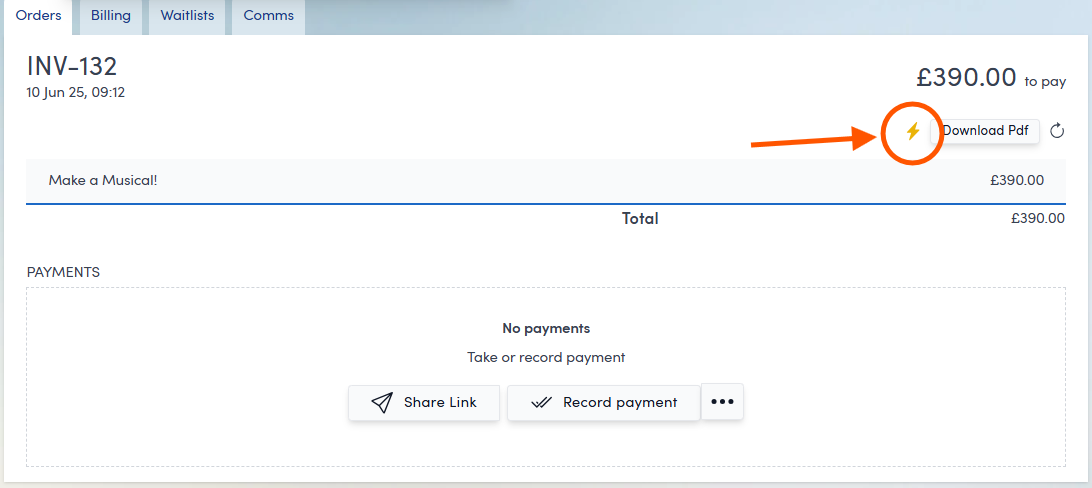
- Click the view button next to the outstanding invoice

- Find the lightning bolt icon and click it - it will change from gold (indicating invoice email reminders are on) to outlined with a line through (indicates off)
2. At the Customer Account level
If you would like to disable all email invoice reminders for a particular customer, for all orders and invoices they make, you can:
- Find the Customer in Swiftlier
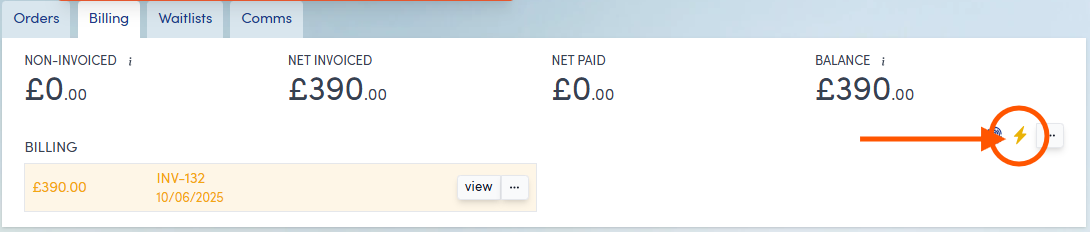
- Click the Billing tab
- Find the lightning bolt icon in the top right of the tab and click it - it will change from gold (indicating invoice email reminders are on) to outlined with a line through (indicates off)
Circumstances in which email invoice reminders won't send automatically
There are a few circumstances in which Swiftlier won't send email invoice reminders. These are as follows:
- If the due date of an invoice is less than 7 days after the order was placed, Swiftlier won't send the email reminder scheduled to go on the invoice due date. The customer will (almost certainly) have received an email inviting them to pay when they placed their order, so Swiftlier won't send a second reminder within a week.
- If the Customer's account as a whole is balanced, no reminder emails will send. This is to mitigate against the risk that an unallocated credit will offset the balance of any outstanding invoice(s). In such a case, no further payment will be expected from the Customer, so no reminder is necessary.
- If the amount outstanding on the invoice in question is less than the threshold amount, Swiftlier won't send an email reminder. The default threshold amount is £10 - please contact your Customer Success representative if you would like to amend this amount for your organisation.
SMS invoice reminders
Swiftlier does not currently support the automatic sending of invoice reminders by SMS message - reminders are sent by email only.
SMS messages can be sent one-by-one to Customers via the Profile screen, by clicking on their phone number.