View and print a credit note
Upon the automatic or manual creation of a credit note (by cancelling an order or line item on an order) it is possible to view and print it.
They can be viewed and downloaded from both the Orders and Billing tabs for an individual order.
Viewing and printing a credit note in the Orders Tab
In the Orders tab you will see a variety of information relevant to that order. If the order has had a credit note successfully created it will appear at the bottom of the tab 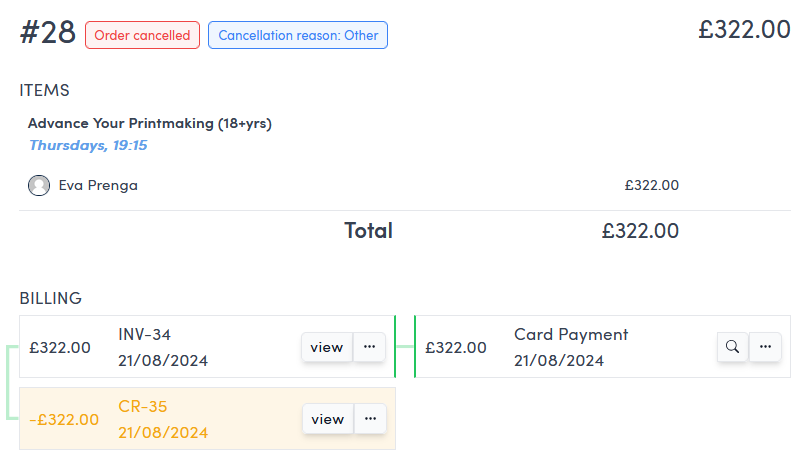 .
.
To download the printable credit note pdf from this view click the three dots  to the right of the view button and credit note information.
This will open a dropdown menu. Click Download Pdf to open a new browser tab from which you can save or print the pdf version of the credit note.
To view the credit note but not its printable pdf click the view button to the right of the credit note information.
This will open a detailed breakdown of the infomation on that credit note. You can also click Download Pdf here to to open a new browser tab from which you can save or print the pdf version of the credit note.
Viewing and printing an credit note in the Billing Tab
In the Billing tab the method is the same as in the Orders tab above except you will see all credit notes raised for that customer.
To download the printable credit note pdf from this view click the three dots on the relevant credit note to the right of the view button and credit note information.
This will open a dropdown menu. Click Download Pdf to open a new browser tab from which you can save or print the pdf version of the credit note.
To view the credit note but not its printable pdf click the view button to the right of the credit note information.
This will open a detailed breakdown of the infomation on that credit note. You can also click Download Pdf here to to open a new browser tab from which you can save or print the pdf version of the credit note.