Stripe Payouts
Swiftlier includes a payment reconciliation tool where you can easily view expected payouts and their details.
Note that the Finance section of Swiftlier can only be accessed with the appropriate permissions.
Viewing Payouts
From anywhere in Swiftlier, hover over the Reporting icon  in the sidebar, and then click the Payouts icon
  . This will take you to the Payouts page.
The Payouts Table
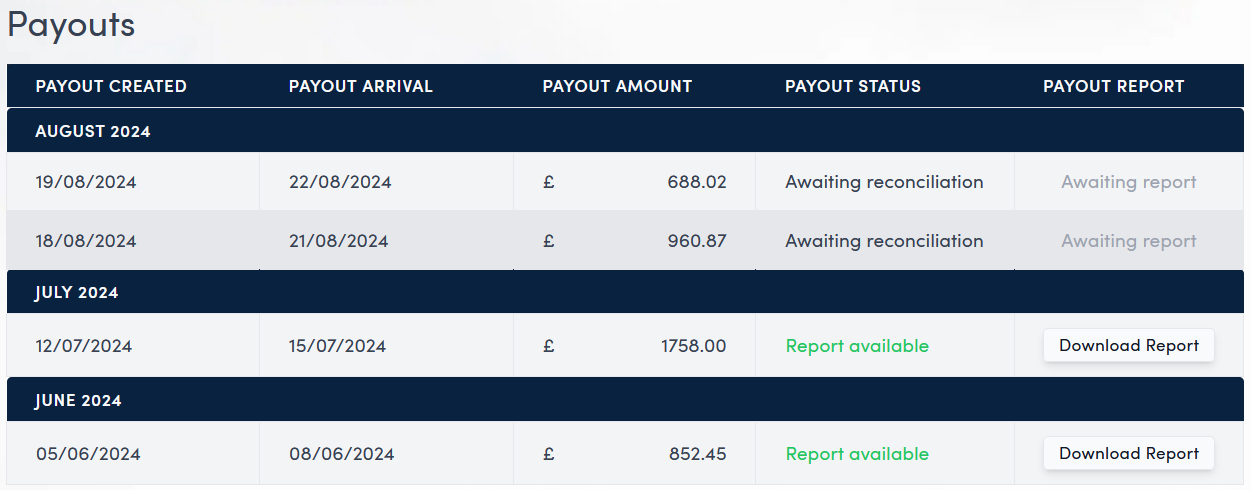
On initial creation of your payout, you will be able to view the date of payout creation, date to expect the payout to arrive in your account, amount of the payout and statuses for the payout and payout report.
All payouts will initially have a Payout Status of Awaiting reconciliation and a Payout Report status of Awaiting report.
After the initial creation of the payout, Stripe will send a reconciliation report (usually around 12 hours later) which will contain details of the payments/refunds etc that make up the payout.
Once recieved, this report will be processed, reconciled with Swiftlier records and the statuses will update.
You will then be able to click the Download Report  button to download a csv file containing all the reconciliation information for that payout.
If there have been any reconciliation errors during the process this will be reflected in the Payout Status and the error will appear in the report csv file.