Concepts
The team behind Swiftlier understands that no two education organisations are identical.
We also believe that shouldn't mean you need an expensive bespoke system or complicated integrations to run your business.
Swiftlier provides highly flexible inventory, scheduling and booking functions, capable of supporting a variety of education and activity business models, without the need for costly customisation.
People and Organisations (Parties)
Each person that is created in Swiftlier is held in our database as a Party.
Likewise, each organisation that is created in Swiftlier exists as a Party.
Various data points can be recorded against Parties, including relationships to other Parties (e.g. parent and child), attributes, and the roles which they currently hold as a result of their interactions with your organisation.
Each Party should have a unique email address. Swiftlier will permit duplicate parties with the same email address (as part of our philosophy to place no barriers between the customer and a sale) - however, Swiftlier also provides powerful merging and archiving functionality to make record management simple.
A Party can be assigned to roles.
Roles
In Swiftlier, the key roles that a Party can perform are:
- Customer: a party that makes an order, sends a payment or receives a refund. Also referred to as a Payer. When a Customer has made a purchase, they are considered to have opened an Account.
- Attendee: a person who will attend (and/or who has attended) a session of a course.
- Staff: a person who is a member of your staff and may need access to the Swiftlier HQ. Must be invited by another Staff member with Administrator rights.
- Instructor: a person who will attend a session in order to supply the service. This could be a tutor, trainer or an assistant.
It is possible for a single person to be in all 4 roles - although this is rare, Swiftlier can handle it!
Products and Pricing
When you set up a product (sometimes called a Service) you are asked to specify what kind of service you're creating. The following options are available:
- Series Basis - the customer buys a pre-defined collection of Sessions, grouped into a Series. An example of this is a term's worth of sessions, for which the dates and times have been determined by the institution;
- Single Sessions - the customer buys a place for particular pre-scheduled single Session of a class, where the date and time are set by the institution;
- Adhoc Basis - the Sessions of this service will not be pre-defined but instead will be bespoke for the Party who is buying it. An example of this would be Individual Tuition, for which the times and dates are not fixed until the customer, organisation and teacher have agreed a suitable time.
You can decide whether to offer each service through the online shop, over the phone, or through the HQ only (for in-person and/or phone bookings).
Drop Ins
For services that are sold primarily on a Series Basis, you may also wish to make the individual Sessions available as 'Drop In' purchases - for those customers who don't want to commit to the full series, but are available to come occasionally. Swiftlier gives you the option to create an additional, separate drop-in Product Instance (see below), which can be priced differently.
Product Instances
A Product Instance is a sub-type of a Product. Product Instances are useful when you wish to sell variants of a Product that are significantly different from the core Product in what they are, how they're sold or what you charge; however, you still want them to be related to the core Product and grouped under its banner.
An example of this could be a group Grade 5 Ballet class that requires an Audition to enter. One-off Audition slots are charged and booked differently from a term's lessons; however, the customer is still booking Grade 5 Ballet.
Equally, when selling a course as a Series, but also allowing Drop Ins to take any spare spaces, this requires two Product Instances - a Series-basis instance for the group of lessons, and a Session-basis instance for the Drop In sales.
Product Instances can also have the following differences from the core product:
| Data point | Enables | Example |
|---|---|---|
| Different age requirements | Set different age restrictions for specific product instances | A Modern Ballet course with separate levels for different age groups, or auditions only for younger pupils |
| Different onboarding policy | Collect different information during onboarding depending on the instance | Auditions require minimal onboarding details, while full bookings require full pupil information |
| Different communications policy | Send tailored email or SMS communications per product instance | Automatically send an SMS to teachers when a new pupil books an instrument trial (but not when they book a full term) |
| Different availability | Control where each product instance can be booked | Auditions bookable via the shop, while main course bookings must go through HQ |
| Different pricing | Apply different pricing models to different instances | £30 flat rate for a 30‑minute trial versus £45/hour for lessons booked as a series |
| Different ledger account | Allocate revenue from different instances to separate ledger accounts | Audition sales recorded in one account, full‑year bookings in another |
All of the above can also be set to be inherited from the master Product to speed things up, should you wish.
As ever, Swiftlier is designed to significantly reduce the admin time required to set up products and get selling. However, Swiftlier can still handle the nuances of your business elegantly - Product Instances is just another way that we deliver the flexibility you need.
Pricing Policies, Discounts and Payment Plans
Swiftlier makes it easy to set and amend how much you are charging for your Products, using Pricing Policies.
Pricing Policies are created and managed centrally via settings; and you select the relevant policy that should apply to a Product or Product Instance via the Product's settings. You can read more about Pricing Policies here.
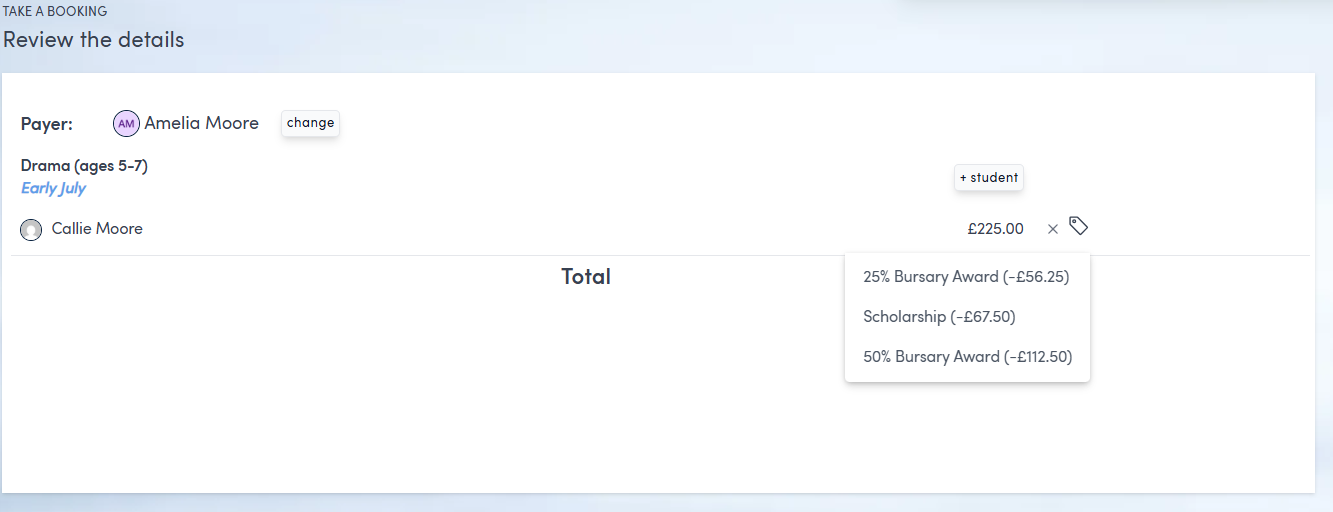
Discounts are managed separately to prices and can be set up to function on a percentage or fixed basis. These can then be applied manually by your head office users when preparing an order for a customer (see below). A future release of Swiftlier will enable discounts to be applied manually, based on factors such as previous bookings.
It's possible to set up different Payment Plans, and make these available by course, through Swiftlier's Invoice Schedule Templates capability. You can read about Invoices Schedules in detail here: Invoice Schedules. As at April 2026, invoice schedule templates are not currently configurable through the user interface of Swiftlier - contact your Customer Success representative if you would like to add, remove or change the available payment plans for a given Product/Course, and one of our team will apply this quickly and efficiently for you in the database.
Scheduling
Session
A Session is the period of time, on a particular day, in which a lesson is taking place and for which you expect attendees to join. For example, Wednesday 9th September 2026, 9:30-11:30.
The session date and times are shown to the attendee in their confirmation emails and their Customer Portal, to indicate when they are expected to be attending.
Attendees are allocated to a particular "spot" on the session.
You can attach a "time period" to a session for reporting/invoicing purposes. For example, if you organise in terms or years you can attach the session to a particular term or year to help with deferred revenue calculations.
Series
A Series is a collection of sessions. Sometimes a series may contain "Tracks". When a product uses Tracks, an attendee may only attend Sessions on that particular track, as opposed to all sessions in the series.
Rooms and Instructors
Rooms and instructors can be allocated to sessions either at the same time as the session itself or independent of those times.
For example, you may require time to set the room up so the room is allocated to the session an hour earlier than the session starts.
This prevents other sessions from taking the room, or the teacher being allocated to something else during the time they need to prepare for or close down a lesson.
Baskets, Orders and Invoices
Swiftlier makes a clear distinction between Baskets, Orders and Invoices.
A Basket in Swiftlier is much like an Amazon shopping basket. You can put services and products in to the basket and get the latest price. Customers can create baskets in your shop or you can create a basket in the HQ and then send that basket to the customer to pay.
An Order is made when the customer commits to their basket, forming a contract with you for the service(s).
Typically, an Order is automatically confirmed but it is possible for an order to be unconfirmed. For example, when the service they are ordering has run out of space.
Once an order has been created an Invoice may be raised, either to ask for payment or to record that a payment has been received.
You can find more information about Invoice and Payment tracking in the Finance section of this documentation.