Relationships
You can record how a person is related to another person using the connections panel on the left hand side of a person record.
When there are no connections the following will display

When a person have relationships added they will display in the left hand side panel like the example below
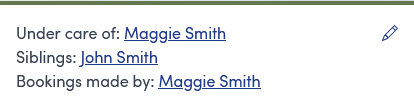
In this example, Mary is the child of Maggie and has a brother called John. Maggie has made a booking for Mary
Add a relationship
To add a connection, use the pencil icon  and then click
Find an existing person using the search box and choose how they are related and then click the Add button.

Remove a relationship
To remove a relationship, use the pencil icon and then click the  button next to the relationship you wish to remove